
You hit delete on a message and felt a little better.
That relief is mostly imaginary.
The message left your screen, but it did not leave the world.
What survives after I press delete?
A backup still has a copy.
Your chats back up to Google Drive or iCloud on a schedule.
That copy was made before you changed your mind.
The other person still has the message sitting on their phone.
Deleting on your side does not reach into somebody else's device.
Traces also linger in the metadata.
Metadata is the information around a message rather than inside it.
Who sent it, to whom, at what time.
Delete clears your screen, not the record.
Why does this matter for an ordinary chat?
Most of what we send is harmless, and nobody is chasing your grocery list.
The problem is the small handful of messages you would genuinely mind.
A salary figure, a home address, an angry line typed at midnight, a photo shared in confidence.
Those are exactly the ones people delete in a hurry and then assume are gone.
The wrong assumption is the risk, not the message.
What actually makes a message vanish?
Disappearing messages.
Switch it on for a chat and every new message removes itself after a set time.
It goes from both phones, not just yours.
That is the thing plain delete can never do.
It also works quietly, without you having to remember anything later.
In WhatsApp you will find the setting at Settings -> Privacy -> Default Message Timer.
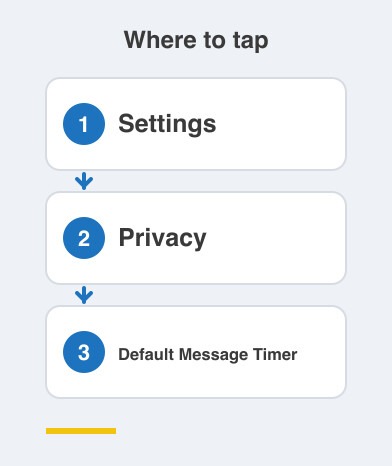
Set it once and every new chat starts with the timer already running.
Does this make me completely safe?
No, and it is worth being honest about that.
The other person can still take a screenshot, or photograph the screen with a second phone.
They can forward the message long before the timer runs out.
Disappearing messages reduce the pile of old conversations sitting on devices for years.
They do not control a determined human being.
They also do nothing about metadata, because the fact that the two of you talked still exists.
So treat this as good hygiene rather than a guarantee.
Send anything truly sensitive the way you would say it in a crowded lift.
Assume it can be repeated.
Things to Remember
- Stop treating delete as proof that something is gone.
- Turn on disappearing messages for chats that carry personal details.
- Remember the other person's phone and your own backup both hold copies.
- Never send anything you would hate to see forwarded.