
Somebody added you to a group with fifty people in it.
You joined for the memes and the forwards.
You never thought about what else you were handing over.
What does a big group chat expose?
Every number in that group is visible to everyone in that group.
That includes people you have never met and never will.
Fifty near-strangers now have a working phone number.
With your name attached to it.
You did not agree to that.
Whoever created the group agreed on your behalf.
What can people work out from it?
Message timings show who is awake at three in the morning.
Reply patterns show who talks to whom, and who nobody bothers answering.
Over a few months, a busy group draws a map of a whole social circle.
Friends, colleagues, neighbours, relatives.
All connected by nothing more than who replies to whom.
Not one private message had to be read for any of that.
Where does all of it end up?
Anywhere at all.
A screenshot travels in seconds and cannot be called back.
Anyone in the group can forward the entire conversation elsewhere.
Your number travels with it, into groups you know nothing about.
The bigger the group, the likelier that one member is careless.
How do I use groups more sensibly?
Ask before you add someone, and expect the same courtesy in return.
Keep groups small and give each one an actual purpose.
Control who is allowed to add you.
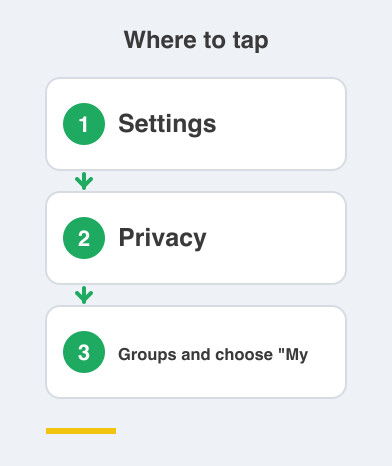
On WhatsApp go to Settings -> Privacy -> Groups and choose "My Contacts".
Leave the groups that went quiet two years ago.
An old group is still a live copy of your number.
If a group has to be large, treat everything in it as semi-public.
That includes photos of your family.
Your address for a delivery, and the number plate of your car.
None of that is paranoia.
It is the same instinct that stops you reading bank details aloud on a crowded train.
Things to Remember
- Assume every member of a group can see and save your number.
- Set Settings -> Privacy -> Groups so strangers cannot add you at will.
- Leave dead groups instead of letting them sit there with your number in them.
- Never share addresses, documents or family photos in a group of fifty.
- Ask permission before adding anyone else, and expect it before being added.