
Every app asks for something the first time you open it.
Location, contacts, photos, the camera.
Most of us just tap "Allow" and move on.
But do you remember what you handed over?
What might my apps be holding right now?
Your location, often set to "always" rather than just while you use them.
Your contacts, meaning your full address book, copied to their servers.
Your photos, meaning your entire library, not the one picture you actually shared.
Your microphone and camera, granted once and kept until you remove it.
None of this expires on its own.
A permission you gave three years ago to an app you have opened twice is still live today.
Why does it matter if I trust the app?
Because "always" is a far bigger promise than "while using".
An app with always-on location knows where you sleep, where you work and where you were on Sunday evening.
Your address book isn't only your data either.
It is your friends' phone numbers, handed to a company they never agreed to.
Apps also change hands, so the little utility you installed years ago may be owned by somebody else now.
The safest permission is the one you never gave.
How do I take it back?
The good news is that this takes about two minutes.
On Android: Settings -> Privacy -> Permission manager.
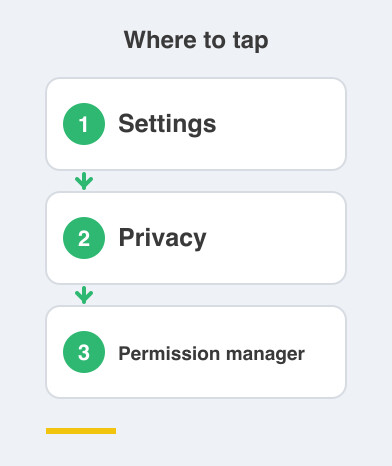
On iPhone: Settings -> Privacy & Security.
Go through the list one permission at a time rather than one app at a time, because the odd ones jump out much faster that way.
Set location to "While using".
Switch off anything an app has no business needing.
A torch app doesn't need your contacts.
What if I switch off something an app needs?
Nothing breaks permanently, and that is the reassuring part.
If an app genuinely needs a permission, it will simply ask again the next time you use that feature.
You can say yes then, with the real reason sitting in front of you.
That is a much better moment to decide than at install time, when you had no idea what the app was going to do.
Deciding in context is most of the benefit here.
Things to Remember
- Do a two-minute permission check today, not someday.
- Android: Settings -> Privacy -> Permission manager.
- iPhone: Settings -> Privacy & Security.
- Set location to "While using" unless there is a clear reason not to.
- Be strictest about contacts, because that data belongs to other people.