
You install a new app and the very first screen is warm and helpful.
"Find Friends" it says, with a big button underneath: Allow Contacts.
It feels like a small favour to yourself, so you tap it.
What did I just hand over?
Every name and number stored in your phone.
Your relatives, your doctor, your boss, your landlord, your ex.
Also the labels you wrote next to them, which are often more revealing than the numbers.
"Cardiologist", "lawyer", "Ravi loan", "Dad emergency".
The app now holds all of it, on its servers.
Why is this different from sharing my own data?
Because most of those people are not your data to share.
Many of them never installed the app, never read its policy, never agreed to anything.
They gave you their number so you could call them.
Not so a company could file them away.
Their record now exists inside a service they have no account with and cannot log in to delete.
You did not share your data.
You shared everyone's.
What does the app get out of it?
Contact uploads are how apps build the map of who knows whom.
That map is worth far more than any single phone number.
It tells the company that you and your doctor are connected.
That you and a stranger share several mutual contacts.
That two people in the same building talk every day.
Relationships, not identities, are the valuable part.
Which is why the button sits on the very first screen, dressed up as a feature.
How do I say no without breaking the app?
Just decline it.
Almost every messaging app works fine without your address book.
You can always type a number in manually.
On Android the permission lives at Settings -> Apps -> [app name] -> Permissions -> Contacts.
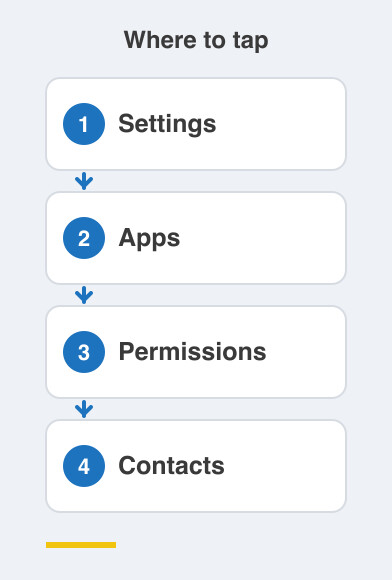
On iPhone it is Settings -> Privacy & Security -> Contacts.
That screen lists every app that ever asked.
Go through that list today and switch off anything that has no real reason to be there.
A photo editor does not need your contacts.
A shopping app does not need your contacts.
If an app refuses to work without them, that refusal is information about the app.
Things to Remember
- Treat Allow Contacts as the biggest permission on the screen, not the smallest.
- Decline it in any app that is not a genuine messaging app.
- Audit the contacts permission for every installed app this week.
- Remember your address book contains people who never agreed to anything.