

Everyone in the house keeps the remote close during a film.
Loud in the action scenes, and then nobody can make out a word.
The volume is not the problem.
Why can I not make out the dialogue?
Sound needs air to move, and moving air needs space behind the speaker.
A television is now about as thick as a finger.
There is no space at all.
The speakers also point downwards or backwards.
The whole front is screen.
So the sound bounces off the wall before it reaches you.
What survives that journey is the thin, middle part of the sound.
Voices sit in the same range as music and effects.
So they get buried.
This is why an old boxy television often sounded clearer.
Will a sound bar actually fix it?
A sound bar is a long speaker cabinet that faces you.
It sits under the television.
It has depth and it points the right way.
So dialogue becomes noticeably clearer.
That is the honest reason to buy one, not the promise of surround effects.
It is worth it if people keep asking what did he say.
It is worth it if you watch films rather than news.
It is not worth it for news and serials at moderate volume.
Before spending anything, try two free things.
Look in Settings -> Sound for a mode called Speech, Voice or Clear.
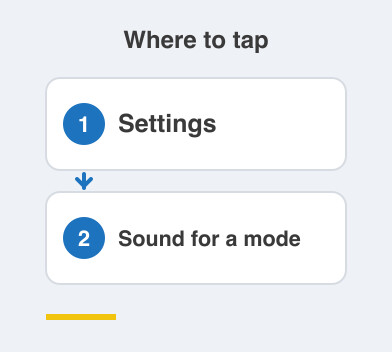
Switch off any surround processing while you are there.
Then check the set is not standing on a cloth.
Check it is not shut inside a cabinet either.
Both muffle it badly.
How does it connect, and which remote do I use?
Look on the back for the HDMI port labelled ARC or eARC.
ARC stands for Audio Return Channel.
It lets sound travel back out of the set down that cable.
Connect the bar to that port with one HDMI cable.
The television's own speakers then switch off by themselves.
The next part is the important one.
With ARC, your television remote usually controls the bar's volume.
So you carry on with one remote.
If your set has no ARC port, use an optical cable instead.
You will then probably need the bar's own remote for volume.
Check for that port before you buy, not after.
Things to Remember
- Try the Speech or Clear sound mode before spending money.
- Make sure the television is not muffled by a cloth or a cabinet.
- Look for the HDMI port marked ARC and use that one.
- Buy a sound bar for clearer dialogue, not for surround effects.
- Keep the house down to one remote wherever you can.