

The film stops and a circle spins.
Somebody says the internet plan is too slow.
It usually is not.
Buffering has a short list of causes, and your plan is rarely at the top.
What is buffering, in plain terms?
Your television does not download the whole film before starting.
It downloads the next few seconds while playing the current ones.
That small store running ahead of you is called the buffer.
When data arrives slower than you watch, the store empties.
The picture then stops and the circle spins.
So buffering is about a steady supply, not a big number on your bill.
Is my internet plan too slow?
Streaming needs far less speed than most people assume.
If web pages load fine on your phone in the same room, the plan is probably not the problem.
Plans do start to matter when several people stream during a video call.
Before blaming Jio or Airtel, test the same show twice.
Try it at eleven in the morning and again at nine at night.
If only the evening fails, you are seeing congestion.
Congestion is not the same thing as a slow plan.
Is the Wi-Fi even reaching the TV?
This is the real culprit in most homes.
Wi-Fi weakens as it passes through walls.
The television is usually the furthest device from the router.
A concrete wall, a metal cabinet or a router behind the sofa all cut the signal.
Most televisions show signal strength under Settings -> Network.
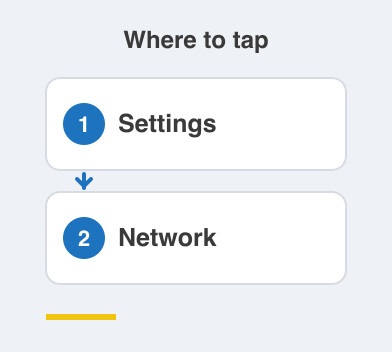
If it reads weak or fair, you have your answer.
Two fixes work here.
Move the router into the open and higher up, or run a network cable to the television.
A cable is unglamorous, and it ends the argument permanently.
What should I try, in order?
- Restart the router, wait two minutes, then restart the television.
- Check the signal strength in the television's network settings.
- Move the router out of the cupboard and away from metal furniture.
- Pause other downloads and phone backups while you watch.
- Lower the video quality in the app and see if playback steadies.
- Note the times of day it fails before calling anyone.
Work down that list and stop at whichever step fixes it.
Things to Remember
- Treat buffering as a connection problem before a plan problem.
- Check signal strength at the television before blaming your provider.
- Get the router out of the cupboard and into the open.
- Run a network cable if the TV room is far from the router.
- Record whether it fails only in the evening before you complain.