Most privacy settings are buried so deep that you give up halfway.
You open Settings, scroll, tap something hopeful, and land in notifications.
This one is not like that.
The single most important privacy setting in Claude is four taps away.
What are the four taps?
They are the same on the Free, Pro and Max plans.
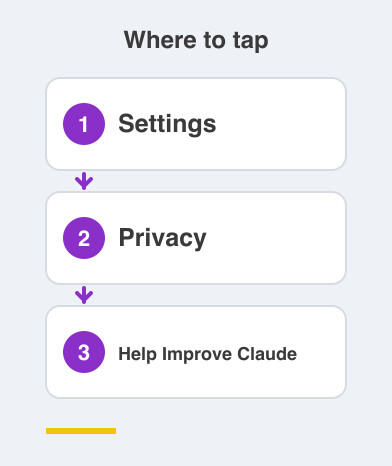
- Tap your name, then Settings
- Select Privacy
- Find "Help Improve Claude"
- Toggle it OFF
That is it, and you are done.
From then on, new chats will not be used to train Claude's models.
Why is this the setting that matters?
Because it decides whether your words leave the conversation.
Everything else in Claude is about what happens inside your chat.
This switch is about whether that chat feeds future versions of the model.
That is the difference between a tool you use and a tool you contribute to.
Neither choice is wrong.
It should just be a choice you made on purpose.
Does it clean up my old chats too?
No, and this part is worth reading twice.
The setting only affects chats going forward.
Anything already inside a training run that has started cannot be pulled back.
So the sooner you set it, the less sits behind you.
Been using Claude for months without checking?
Do not panic.
Change the setting now, and everything from this moment on is covered.
Who should turn this off today?
Anyone using Claude for work that is not theirs to share.
Think of a CA drafting a client note.
A doctor rephrasing a report.
A teacher writing about one particular student.
Anyone who has pasted in a bank statement to make sense of it.
If a colleague would wince at you forwarding that text, the toggle belongs OFF.
Use Claude for recipes, travel plans and code puzzles, and you may happily leave it on.
Just know which of the two you are.
Right now the app has an answer for you either way.
Take a moment and go look.
Things to Remember
- Follow the path exactly: your name -> Settings -> Privacy -> "Help Improve Claude".
- Toggle it OFF if you want new chats kept out of model training.
- Know that it applies going forward, not to training already underway.
- Set it before a sensitive project, not after you have pasted everything in.
- Recheck the setting occasionally, especially after signing in on a new device.