
The moment the Wi-Fi router acts up, we switch it off and on.
The phone we just suffer.
That is odd.
Two boring little steps fix more slowdowns than any "cleaner" app ever will.
Better still, the speed fixes are already sitting on your phone.
They are just waiting to be installed.
Why do updates make a phone faster?
Because makers ship speed and battery fixes inside them.
An update is not only new features and a fresh set of emoji.
Much of it is quiet repair work.
It fixes the very things that were making your phone stutter.
So do the system update first.
Then do your apps as well.
On iPhone: Settings -> General -> Software Update.
For iPhone apps: App Store -> profile -> Update All.
On Android: Settings -> System -> System update.
For Android apps: Play Store -> profile -> Manage apps -> Update all.
Plug the charger in and use Wi-Fi.
A big update on mobile data is a sad way to spend your Jio pack.
Does restarting really do anything?
Yes, and more than people expect.
A reboot clears memory.
It also kills background processes that got stuck hours or days ago.
Those stuck processes are invisible to you.
Your phone is still carrying them all the same.
Once a week is plenty.
On iPhone: Settings -> General -> Shut Down, wait, then power back on.
On Android: hold Power, then tap Restart.
Do it while you are eating dinner and you will not notice.
What if only one app is misbehaving?
Then do not reset the whole phone for it.
Deal with that one app on its own.
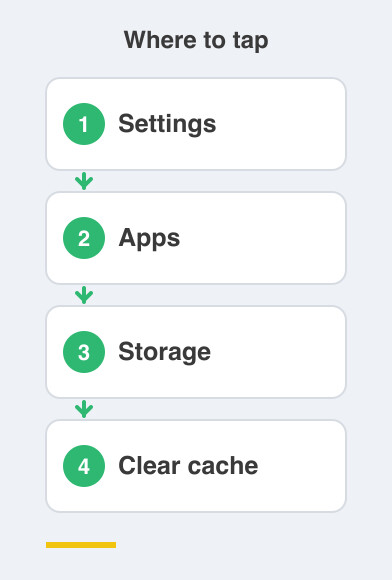
On Android: Settings -> Apps -> (app) -> Storage -> Clear cache.
On iPhone there is no cache button.
Use Settings -> General -> iPhone Storage -> (app) -> Offload App, then reopen it.
Offload removes the app but keeps your data and your login.
Reopening it puts everything back where it was.
That one step often revives an app that had become slow or refused to load.
Things to Remember
- Install pending system updates, then update your apps too.
- Restart the phone once a week, exactly as you reboot the router.
- Update on Wi-Fi with the charger plugged in.
- Fix one bad app by clearing its cache or offloading it.
- Do not reach for a reset when a single app is the problem.