
Before you spend thirty thousand rupees on a new phone, check this first.
Most "slow phone" problems are really "full phone" problems.
Free up the space and the speed comes right back.
For free.
Where does all my space actually go?
Photos and videos, more than anything else.
They are the number one space hog on almost every phone.
Back them up first.
Only then clear them off the handset.
On Android: Google Photos -> turn on Backup -> tap "Free up space".
On iPhone: Settings -> Photos -> iCloud Photos ON -> "Optimise iPhone Storage".
Next comes WhatsApp media, which nobody thinks about until it is enormous.
Every saved meme and every forwarded video piles up quietly.
On both phones: WhatsApp -> Settings -> Storage and data -> Manage storage.
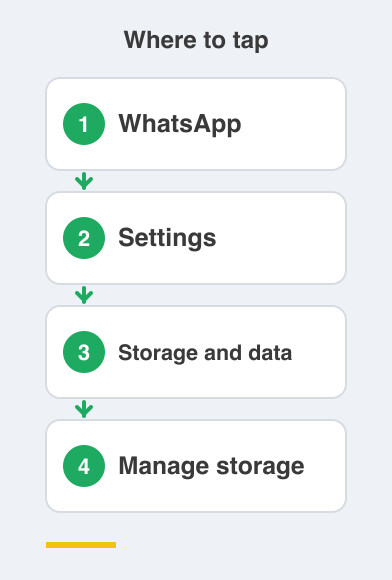
Clear the large and forwarded media from there.
While you are in there, turn off media auto-download so it stops refilling itself.
What about the apps I never open?
They are just sitting there taking space.
If you have not opened something in months, it does not deserve the room.
On Android: Settings -> Apps -> Uninstall.
On iPhone: Settings -> General -> iPhone Storage, then Offload or Delete.
Offload removes the app but keeps your data and your login.
That is handy for things you use once a year.
Is clearing cache safe?
Completely safe, yes.
Cached files are temporary files an app creates to load faster.
They rebuild on their own the next time you open the app.
Nothing of yours is lost.
On Android: Settings -> Apps -> the app -> Storage -> Clear cache.
On iPhone there is no cache button at all.
Just offload the worst offender and reopen it.
How do I find my biggest hogs quickly?
There is one screen on each phone that tells you everything.
On Android, go to Settings -> Storage.
On iPhone, go to Settings -> General -> iPhone Storage.
Both show a list sorted by size.
The worst culprits sit right at the top.
Ten seconds there will tell you more than an hour of guessing.
Start at the top of that list and work down.
Things to Remember
- Back photos up before you delete them from the phone.
- Clear large and forwarded WhatsApp media, then turn off auto-download.
- Uninstall or offload apps you have not opened in months.
- Clearing cache is safe and reversible, so do it without worry.
- Check the storage screen first so you fix the biggest problem, not the easiest one.