
Sometimes the phone is not tired of you.
Its battery is just tired.
This is the last piece of the puzzle, and it is the one almost nobody checks.
Why does a worn battery slow the phone down?
A battery ages past roughly 80 percent of its original capacity.
After that it can no longer deliver power smoothly.
So the phone deliberately slows itself down to avoid sudden shutdowns.
That is a safety measure, not a fault.
So a "slow" phone is sometimes just a worn-out battery in disguise.
On an iPhone, check it at Settings -> Battery -> Battery Health & Charging.
On Android it varies by brand.
Try Settings -> Battery, or your maker's own diagnostics app.
If the number is low, a battery swap is far cheaper than a new phone.
It can also make an old handset feel genuinely brand new again.
What if it is still sluggish after everything?
Then it is time for the big reset.
Back up first, properly.
Use Google Photos or iCloud, plus your usual accounts.
Once you are certain the backup is done, do a factory reset.
It wipes years of buildup.
You get a phone that behaves like it did on day one.
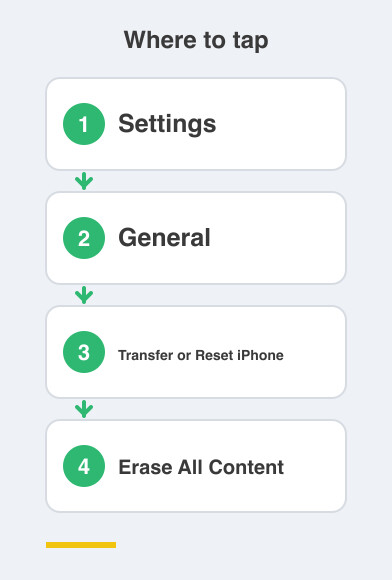
On iPhone: Settings -> General -> Transfer or Reset iPhone -> Erase All Content and Settings.
On Android: Settings -> System -> Reset -> Erase all data.
Give this an unhurried evening.
Not a rushed ten minutes before work.
When is it honestly time to upgrade?
There is a point where the answer really is a new phone.
Five or more years old, a dead battery, and no more updates?
That point has arrived.
And that is completely fine.
You will have squeezed every last drop out of it.
That is more than most people manage.
What is the whole checklist again?
Save these five steps and run them on any slow phone, in this order.
One, free up space.
Two, cut background apps.
Three, update everything.
Four, restart weekly.
Five, check battery health.
Run all five before you ever spend thirty thousand rupees on a replacement.
Your "old" phone will surprise you.
Things to Remember
- Check battery health before you blame the phone itself.
- A battery replacement costs a fraction of a new handset.
- Always finish a full backup before you factory reset anything.
- Run the five-step checklist first, and treat a new phone as the last resort.