

Your phone is doing chores all day that you never asked for.
The setting responsible is called Background App Refresh.
It lets apps update themselves quietly, around the clock.
Even the ones you open once a week.
That is a constant tax on speed and battery.
Should I just turn it all off?
No, and this is where most advice goes wrong.
Turn it off for the apps that do not need it.
Keep it on for the ones that do.
Switch it off for shopping apps.
Switch it off for video and streaming apps.
Switch it off for news and feeds.
Switch it off for social apps too.
All of these reload the instant you open them anyway.
Refreshing in the background buys you nothing.
Keep it on for chat and messages.
You want those the second they land.
Where is this setting hiding?
On iPhone: Settings -> General -> Background App Refresh.
Turn it off per app from there.
Prefer a middle path?
Set it to Wi-Fi only instead.
On Android: Settings -> Apps -> (app) -> Battery -> Restricted.
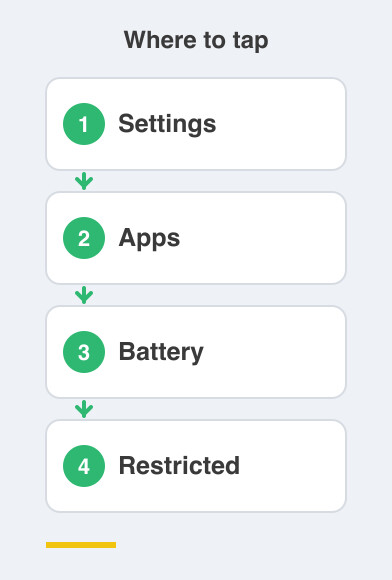
Then turn off "Background data" for that app.
Work through the list once, slowly.
You will not need to touch it again for months.
Are other apps waking up on their own?
Yes, and this one catches many of us in India.
Xiaomi, Realme, Oppo and Vivo phones have a separate autostart list.
Those apps launch themselves the moment your phone boots.
That happens before you have opened anything at all.
Open Security or Phone Manager -> Autostart.
Switch off everything with no business waking up by itself.
What is the simplest win of all?
Delete what you never open.
An app that is gone cannot run in the background.
It cannot refresh and it cannot drain anything.
Go through your home screens once and be honest.
Which apps have you not touched since last year?
You can always install one again if you miss it.
Odds are you will not want it back.
Things to Remember
- Turn off background refresh for shopping, streaming, news and social apps.
- Leave it on for chat and messaging, where speed genuinely matters.
- Check the Autostart list on a Xiaomi, Realme, Oppo or Vivo phone.
- Delete unused apps, the cleanest way to stop them working overtime.