
Most of us have had a Google account for years.
Very few of us have ever looked inside it.
There is one page that shows everything Google has saved about you.
Almost nobody opens it.
Your Google account is not just email.
It is quietly holding years of your digital life.
All of it shares one account and one storage limit.
What is actually sitting in there?
Six things, mostly.
Gmail holds every email you have ever sent or received.
Drive holds your documents, your files and your phone backups.
Photos holds years of pictures and videos.
Search keeps a log of almost everything you have typed into it.
Location keeps a timeline of everywhere you have been.
YouTube keeps a record of everything you have watched.
Read that list again slowly.
That is not a small pile of data.
How do I see it for myself?
Open myactivity.google.com in any browser.
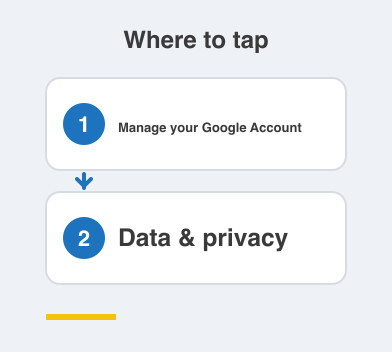
If you would rather use your phone, open the Google app -> your profile photo -> Manage your Google Account -> Data & privacy.
Then just scroll for two minutes.
Most people find searches they had completely forgotten making.
Many find places they visited years ago, listed by date.
It is eye-opening, and that is exactly the point of looking.
Why bother cleaning any of it up?
There are two payoffs, and both are practical.
The first is storage.
Gmail, Drive and Photos all draw from the same free allowance.
That is why "Storage full" appears out of nowhere one morning.
Clearing old junk gives you real space back without paying a rupee.
The second is privacy.
Every search, every trip and every video sits there by default until you decide otherwise.
Delete it, or set it to erase itself automatically.
Either way, you are back in charge of your own record.
Do I have to fix everything today?
No, and please do not try.
Over the next four posts we will clear this out one screen at a time.
Storage first, then Gmail, then tracking, then security.
None of it needs technical skill.
Each step is a handful of taps inside a settings screen you already own.
Things to Remember
- Open myactivity.google.com once and actually read what is listed there.
- Remember that Gmail, Drive and Photos share one storage limit between them.
- Clean up for space and for privacy — the same effort buys you both.
- Work through it one screen at a time instead of in a single panicked sitting.