

Your phone can do a handful of things that nobody ever told you about.
They are not in any manual and they do not appear on any menu.
You either get shown them by a friend, or you go years without knowing.
Each one saves a few taps, which sounds small until it becomes muscle memory.
Then going back feels clumsy.
Which gestures should I learn first?
Back-tap for a screenshot.
Tap the back of your phone twice and it takes one.
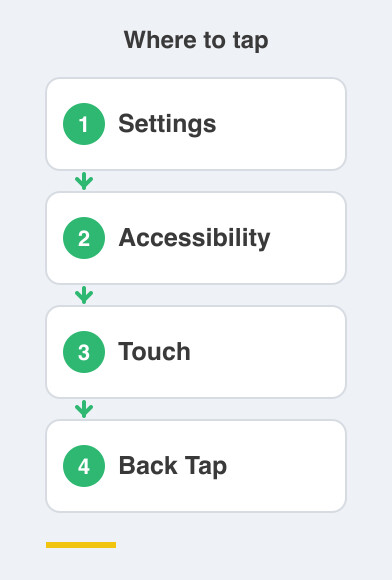
On iPhone this lives at Settings -> Accessibility -> Touch -> Back Tap.
On Android it is Settings -> System -> Gestures -> Quick Tap.
Shake to undo.
Typed something wrong on an iPhone?
Give the phone a little shake and it undoes it.
Shake again to redo, which is handy when you undo one thing too many.
What are the typing tricks?
Hold the spacebar to move the cursor.
Press and hold it, then slide your thumb, and the keyboard turns into a trackpad.
You can place the cursor exactly where you want it.
For fixing a typo in the middle of a long message, nothing else comes close.
Swipe to type.
Instead of tapping each key, glide your finger from letter to letter without lifting it.
It is much faster than it looks.
Both the iPhone and Android keyboards already have it built in.
Give it three days before you judge it.
One-handed keyboard.
On a big phone, shrink the keyboard to one side so your thumb actually reaches everything.
Press and hold the emoji or globe key on the keyboard to switch it over.
Is there one for long pages?
Yes, and it is the easiest of the lot.
Tap the clock or status bar at the very top of the screen.
You fly straight back to the top of the page or chat.
No frantic scrolling through months of messages to reach the beginning.
How do I actually remember these?
Do not try to learn all six at once.
Pick one, use it deliberately for a day, and it will stick without effort.
Then pick the next one.
Once you have two or three, show somebody else.
These are the tips people genuinely love being taught, because the payoff is instant.
Your parents will like the back-tap one especially.
Things to Remember
- Turn on Back Tap or Quick Tap for one-handed screenshots.
- Hold the spacebar and slide to place the cursor precisely.
- Try swipe typing for three days before deciding.
- Tap the status bar to jump to the top of any long page.
- Learn one gesture at a time, then teach it to someone.