
You bought a watch so you could stop pulling your phone out.
Two weeks later your pocket buzzes, then your wrist buzzes.
You check both.
Now every message interrupts you twice.
The watch has doubled the problem it was meant to solve.
Fixing this takes ten minutes, once.
Why does everything buzz twice now?
Because a watch simply mirrors your phone by default.
Every app that could notify you now has a second route to you.
The sale announcement, the game, the group chat with forty members.
A phone buzzing in a bag is easy to ignore.
A buzz on your skin is not.
That is why a wrist alert has to be earned.
Which alerts actually belong on a wrist?
Ask one question of every app.
Would you want this in the middle of a meeting?
Calls belong there, because a missed call may need a decision.
Messages from a short list of people belong there.
Calendar reminders belong there.
Maps directions belong there while you are travelling.
Almost nothing else does.
News, shopping, email and social apps certainly do not.
Delivery and payment alerts feel important, so try a week without them.
How do you turn off the rest?
On an iPhone, open the Watch app and go to My Watch -> Notifications.
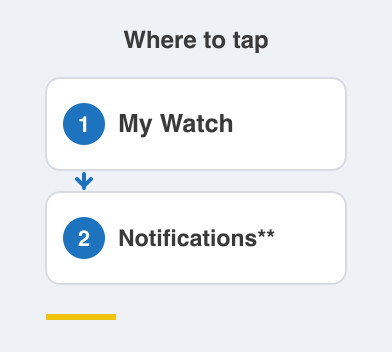
Every app is listed, and you can switch each one off.
On Android, open the companion app and look for Notifications in the device settings.
Work down the list once and be ruthless.
You can always add one back later.
Do the same for the watch's own nudges to stand up and move.
Then set the watch to vibration only.
A silent tap disturbs nobody sitting near you.
What about workouts, meetings and sleep?
Use Do Not Disturb or Focus on your phone.
The watch will follow it automatically.
During a workout, allow calls and nothing else.
At night, switch on sleep mode so the screen stays dark.
Keep one exception for repeated calls from the same number.
That is how a genuine emergency still reaches you.
Things to Remember
- Allow an alert on your wrist only if it deserves a meeting interruption.
- Switch off every app once, then add back the few you miss.
- Keep calls, calendar and a short list of people.
- Use vibration only, never a ringtone from your wrist.
- Let Do Not Disturb cover workouts, meetings and sleep.