
You have worn a band for two years.
The strap is finished and the battery is tired.
You fancy a different brand now.
One question stops you.
What happens to two years of walking and sleeping?
Most people assume it all lives inside the watch.
It does not.
Which app is really holding your data?
There are usually two copies, and they are not the same.
The first is the brand's own app and the account behind it.
That holds the detailed version.
Sleep stages, workout maps and heart rate graphs all sit there.
The second is your phone's general health hub.
On an iPhone that is the Health app.
On Android it is Health Connect.
The hub holds the plain numbers, such as steps, distance and hours slept.
What happens if you change to another brand?
The plain numbers usually survive, since the new app reads the same hub.
The detailed history usually does not.
Brands rarely import a rival's records.
So expect to keep your totals and lose the pretty graphs.
Check before you buy whether the new app connects to the hub at all.
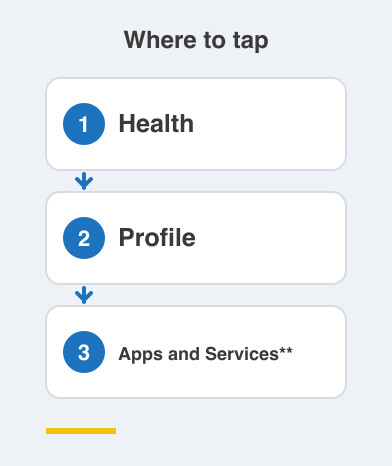
On an iPhone, look under Health -> Profile -> Apps and Services.
On Android, open Health Connect and see which apps can read and write.
What else is plugged into the hub?
Probably more than you remember.
Every app you once linked for a step challenge or a diet plan is still connected to it.
Those forgotten connections are often why a number looks wrong.
Two apps both writing steps into the hub can double your day.
So open the permissions screen, unlink whatever you stopped using, and let one app be the source of truth.
Remember too that a subscription tier often decides how much of your own history you are shown.
How do you get a copy for your doctor?
Ask for an export before you need one.
On an iPhone, tap your picture in the Health app and choose Export All Health Data.
In most brand apps, look for Export or Download my data under account settings.
For a doctor, one clear graph beats a giant file.
Take the trend they asked about, with the dates visible.
Things to Remember
- Remember that the brand app and the health hub hold different things.
- Confirm a new device connects to Health or Health Connect before buying.
- Export your data before you sell or discard the old device.
- Unlink apps you stopped using, so nothing writes duplicate numbers.
- Carry one clear labelled graph to an appointment, not a raw file.