
Most people picture a phone switch as carrying photos across, folder by folder.
That is not how it works any more.
Set up properly, your photos are not really on your phone at all.
They live in your account.
They follow you to whatever phone you sign in on.
The things you can never get back do not need transferring, only syncing.
What should be syncing right now?
Photos and videos come first.
That is Google Photos on Android, or iCloud Photos on iPhone.
Open the app, check that backup is switched on, and wait until it says "Backup complete".
Contacts come next, and they must be saved to your Google or iCloud account.
On Android: Settings -> Google -> check Contacts sync is on.
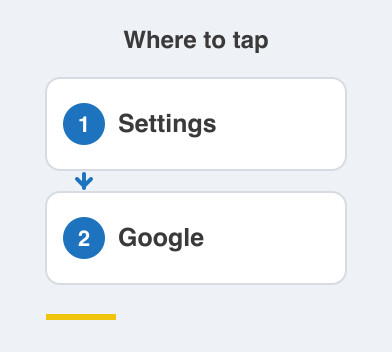
On iPhone: Settings -> [name] -> iCloud -> Contacts ON.
Files and documents belong in Google Drive or iCloud Drive.
If they are already there, they need nothing more from you.
What do I actually do on the new phone?
Sign in with the same Google account or Apple ID.
That is the entire step.
Everything starts downloading on its own, quietly, in the background.
Leave it on Wi-Fi and give it time.
A few years of photos is a lot of data, and mobile data will vanish fast.
Do not panic at an empty gallery on day one, because it fills up as the download runs.
What is the contacts trap?
Contacts saved to your SIM card, or "on this phone only", will not sync.
They were never in your account, so your account cannot hand them over.
You sign in to a shiny new phone and the address book is empty.
Check where your contacts live before you switch, not after.
Move them into your Google or iCloud account first, and sync brings them across by itself.
This is worth the five minutes, because contacts are the one thing you cannot rebuild from memory.
Things to Remember
- Open Google Photos or iCloud Photos and confirm it says backup is complete.
- Move contacts off the SIM and into your Google or iCloud account.
- Keep documents in Google Drive or iCloud Drive so they need no transfer at all.
- On the new phone, sign in with the same account and wait on Wi-Fi.
- Check the address book on the new phone before you wipe the old one.