
The flight is delayed, and the first thing you look for is the free Wi-Fi.
Airports, cafés, malls, hotels, hospitals — give a mobile number, punch in the one-time password (OTP), and you're online.
It feels like a small gift.
What's the problem? Everyone does it.
The moment you connect, you are on the same network as every stranger in the building.
Most of them are just checking email.
Some of them are not.
Isn't everything encrypted now?
Mostly yes, and this part has genuinely changed since I first wrote about it.
Almost every website and app now uses HTTPS, where the "s" means the connection between you and the site is scrambled.
So a stranger on the same Wi-Fi can no longer pluck your banking password out of the air the way they once could.
The old attack has a name: man-in-the-middle, where someone quietly sits between you and the website you think you are visiting.
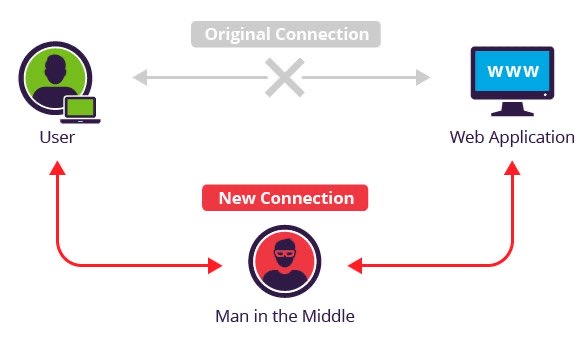
It still works, but usually only when you help it along.
So what actually goes wrong today?
Fake networks.
Anyone can set up a hotspot named "Airport_Free_WiFi" and simply wait.
You join it, and the login page you see belongs to them, not to the airport.
Then it asks for a card number "for verification", or an OTP, or your email password.
That page is the attack now, not the network.
The quieter cost is the mobile number you handed over, which gets sold on and turns into spam calls.
Register it on TRAI's Do Not Disturb list, though don't expect miracles.
What if I have no choice?
Use your own phone's hotspot instead, because data in India is cheap enough that this is almost always the better answer.
If you must join the public network, keep it to reading.
No banking, no payments, no typing in passwords that matter.
And never install anything that a Wi-Fi login page tells you to install.
Do I need a VPN?
Less than you used to.
A VPN, or Virtual Private Network, scrambles everything leaving your device so the network owner sees only junk.
That is genuinely useful, but HTTPS already covers most of what people are afraid of.
If you do want one, pay for it, because free VPNs earn their money by selling what you do online.
Things to Remember
- Turn off automatic joining so your phone never connects on its own.
- Use your own hotspot, with a strong password, whenever you can.
- Never type card details or an OTP into a Wi-Fi login page.
- Keep your phone and apps updated, as that closes more holes than any app you can buy.
- Tell your phone to forget the network before you walk out.
Be safe.